5 tips for a quick start with pretix

When I set up my first pretix ticket shop, I was stunned by the sheer amount of helpful features. Still, I quickly found what I needed for my humble little event, an Open Day. Now that I have changed sides and joined the pretix team, I am yet again stunned. pretix has so much more to offer than what I had discovered back in the day. To help anyone who is setting up their first ticket shop, I compiled a list of 5 useful features for a smooth start.
1. Let quotas do the calculation
Whenever I set up ticket quotas, I ended up doing lots of math in my head: "The venue holds 250 people. We want to offer 100 tickets during the pre-sale, and must not forget 20 student tickets, so the quota for the box office is…"
What sounds like a fairly straighforward math problem gets much more complicated as soon as I had to adjust the pre-sale quota or when a second group of students wanted to attend. If I didn’t pay close attention, I might have overbooked the venue, leaving customers without seats.
Fortunately, pretix can take care of the calculation. Products, in this case admission tickets, can be part of multiple quotas. Whatever quota runs out first, stops the sale of the product, even if other quotas are still available. To effectively set up the event in question, all products are part of the quota "venue capacity." The products "pre-sale" and "student ticket" each receive their own, additional quota of 100 and 20 tickets, respectively.
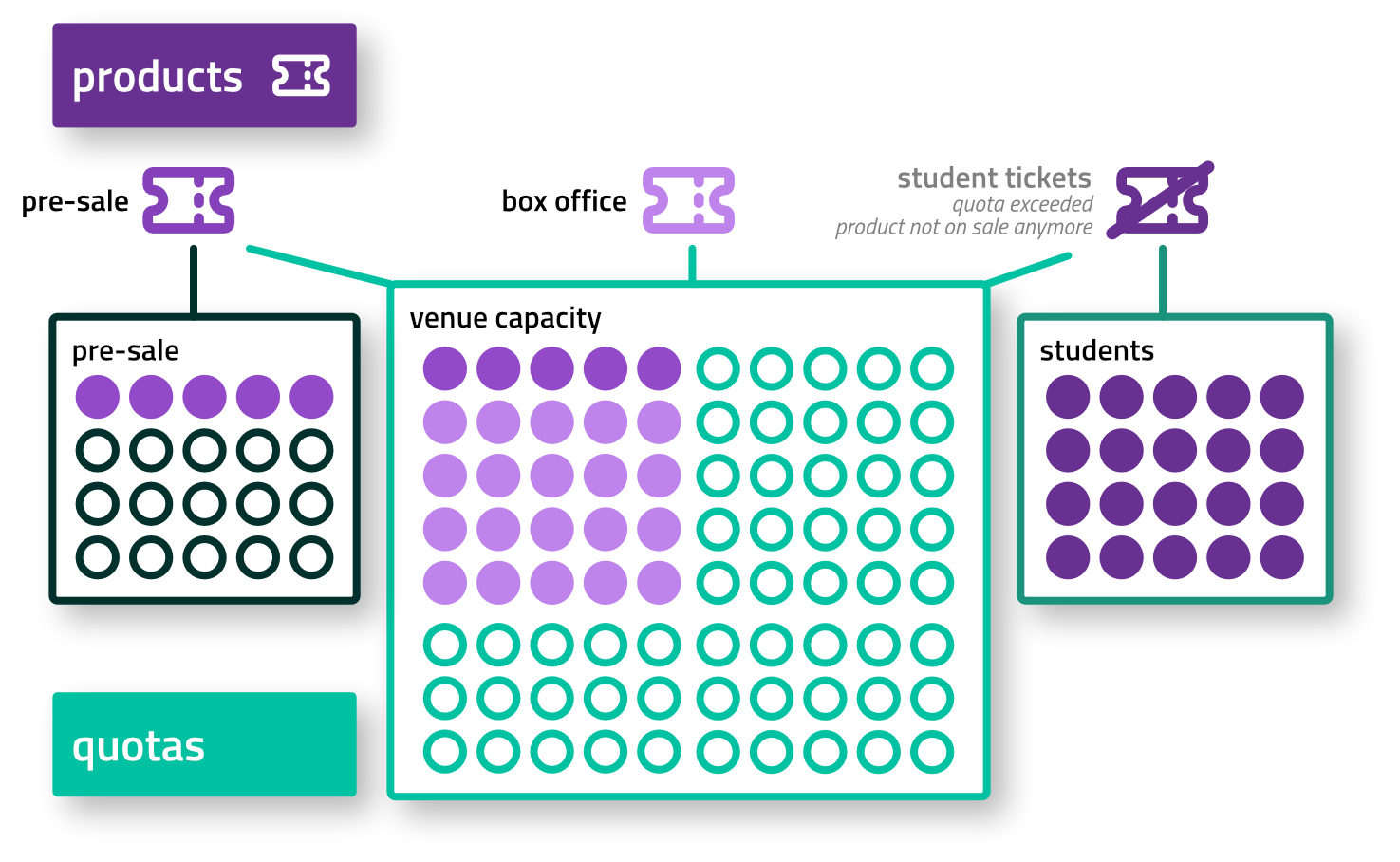
The advantage of using multiple quotas: no matter how well the pre-sale goes, the box-office will simply sell the remaining tickets until the venue is full. It is also no problem to increase the quota for students: the quota for the venue capacity keeps track and reduces the amount of available box office tickets.
The same principle can be applied to other setups: staggered Early Bird tickets, sports events with an uncertain number of guest fans or the booking of combined tour and admission tickets in a museum.
2. Reserve tickets using vouchers
A very common task is the reservation of a ticket prior to a sale. Intuitively, one míght reduce the quota for the product by the amount of reserved tickets. This approach, though, is unwieldy and error-prone. As luck has it, pretix has a better way to handle reservations that does not rely on manually increasing and decreasing the quota of a product: vouchers.
pretix vouchers can do much more than offering discounts on products. They are great at managing bookings dynamically and without losing track of customers. The key is to set the checkbox "reserve tickets from quota."

Now, the voucher can be sent as a link to customers who can use the voucher to place an order. With vouchers it is easy to reserve places on a guest list, invite VIPs or journalists – and all that without ever touching a quota.
And there’s more! By adding expiry dates to vouchers, reservations can be held for a defined period of time after which the tickets go back into the regular sale pool. With relative timings, all vouchers can expire a day before the event to make the tickets available again at the box office.
3. One QR code, many check-ins
If you have ever created a ticket shop that combines admission tickets with additional items such as merch or catering, you have faced a whole bundle of ticket codes included in every order. On location, all of these codes require scanning as well which is not always intuitive for your customers.
pretix to the rescue! With a bit of smart preparation and setting up the backend properly, customers only need to scan one main QR code to get their t-shirt or pick up their lunch box.
For this to work, lunch boxes or t-shirts must be set up as add-on products sold with the main admission ticket. For each product, a check-in list is created with the checkbox set to "Allow checking in add-on tickets by scanning the main ticket".

Now, every station at the event selects the respective check-in list on their pretixSCAN device. Main door staff uses the entrance list, merch is scanned with the t-shirt list and at lunch time, catering uses the lunch box list. No matter what station they visit, customers will always use their main admission code.
There is one important thing to note: all scans need to return an exact result. It not possible to use this approach to check simultaneously for any combination of t-shirt, mugs and posters using just the main ticket code as the scan could never be unambiguous. In this case, individual ticket codes are necessary.
4. Even more features with plugins
pretix can do a lot – and it can do even more. If the standard toolset is lacking a crucial bit of functionality, chances are that a plugin will do the job.
With the "Withdrawal" plugin, shop owners can comply with the new EU regulation regarding straightforward and visually distinct withdrawal options. Check with your legal advisor whether your shop is required to provide a withdrawal button.
It is often necessary to publish terms and conditions, codes of conduct or other information alongside the ticket shop. Using the "Pages" plugin, it is not only possible to create and link to sites but it also takes only a few clicks to anchor them in the footer and require their approval during checkout.
If you want to share digital content, such as links or files, with attendees of your event, the plugin of the same name will offer that functionality. And with the plugin "Certificates of Attendance" enabled, attendees can download a customizable personalized PDF document after the event.
The list of plugins goes on, with features for exhibitors, seating plans or customer accounts. Just scroll through the available options when setting up any new event to find the right plugin to fulfill your event’s needs.
5. Smarter testing
If we would look for the most popular event names, the places one to three would probably go to "Test", "Test event", and "TESSTTTTTTTTTTT". It is no surprise that the large set of customizable preferences in pretix creates the sudden urge to test them out before going live.
At pretix, we feel the same! That’s why we created our test mode to explore (almost) any setting risk-free. Shop design, email copy, vouchers, orders or cancellations – what happens in test mode, stays in test mode. By activating the plugin "fake payment providers", you can go through the entire user journey from start to finish without ever creating real bookings in the system. An order in test mode can be changed, rebooked or cancelled at will and therefore offers a great oportunity to learn the ropes before the sometimes stressful sales period begins.
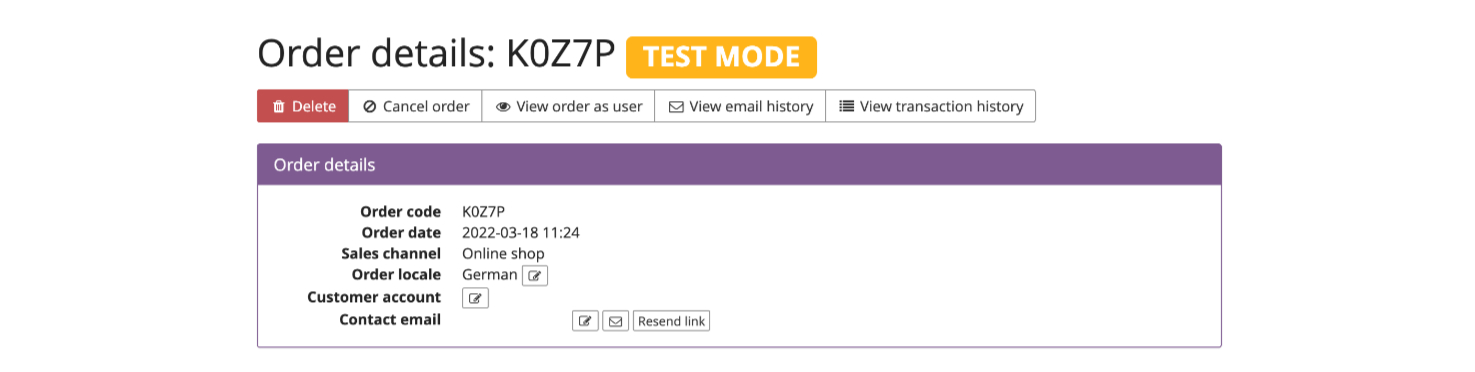
By default, all events start in test mode. That’s on purpose: any tests performed in live mode will create data entries that can not be deleted easily. All real bookings, no matter the intent behind them, need to be documented for the tax office and other regulatory reasons.
That’s why I am using the test mode extensively, creatively and for complex edge cases. By giving my test event real names for products and dates from the start, I can be sure to know my shop in and out before it’s transformed into a live shop with just a few clicks.